Bilinear Interpolation Calculator
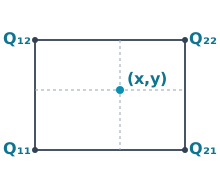
Bilinear interpolation grid with target point (x, y)
P equals the bilinear interpolation of four corner values Q11, Q21, Q12, Q22 at point x, y
Bilinear interpolation diagramA rectangular grid with four red corner values Q11, Q21, Q12, and Q22. A green interior point P marks the interpolated value at (x, y).Q₁₁Q₂₁Q₁₂Q₂₂Px₁xx₂y₁yy₂

Red = known valuesBlue = interpolation pointGreen = result

Solution

Share:

How It Works

Bilinear interpolation estimates a value inside a rectangular grid cell by performing linear interpolation twice: once across one axis to create two intermediate values, and then again across the other axis to combine those intermediates into the final estimate. It works best when the target point lies inside a rectangle bounded by four known corner values.

Example Problem

Estimate the value at x = 1.5, y = 15 inside a rectangle with bounds x1 = 1, x2 = 2, y1 = 10, y2 = 20 and corner values Q11 = 10, Q21 = 20, Q12 = 30, Q22 = 40.

  1. Define the rectangle bounds with x1, x2, y1, and y2, then place the target point (x, y) inside that rectangle.
  2. Assign the four known corner values to the correct corners: Q11, Q21, Q12, and Q22.
  3. Interpolate across x on the lower edge to get the first intermediate value R1.
  4. Interpolate across x on the upper edge to get the second intermediate value R2.
  5. Interpolate between R1 and R2 using the y-position inside the rectangle.
  6. For this midpoint-style example, the bilinear interpolation result is 25.

Key Concepts

Bilinear interpolation extends one-dimensional linear interpolation into two dimensions. Instead of fitting a single straight line, it blends values across a rectangular surface patch. The method assumes the quantity changes smoothly enough across the cell that neighboring corner values provide a reasonable local estimate for the point in between.

Applications

  • GIS and terrain grids: estimating elevation, rainfall, or temperature at a location between sampled grid points
  • Image processing and graphics: blending neighboring pixel values when resizing, sampling, or warping textures
  • Engineering tables: reading intermediate values from two-variable design charts and lookup tables
  • Simulation post-processing: approximating field values on structured 2D meshes without solving a new model point-by-point

Common Mistakes

  • Assigning Q11, Q21, Q12, and Q22 to the wrong corners, which changes the interpolated surface entirely
  • Swapping x and y bounds or using inconsistent point ordering, which can invert the weighting terms
  • Treating a point outside the rectangle as normal interpolation even though the result is really extrapolation

Frequently Asked Questions

What is bilinear interpolation?

Bilinear interpolation is a two-dimensional interpolation method that estimates a value inside a rectangle using four known corner values. It performs linear interpolation in one direction and then again in the other direction.

How do you calculate bilinear interpolation?

You first interpolate across one axis to create two intermediate values, then interpolate between those intermediates across the other axis. The calculator handles those weighting steps automatically once you enter the rectangle coordinates and corner values.

When should I use bilinear interpolation instead of linear interpolation?

Use linear interpolation when your data varies along only one axis between two known points. Use bilinear interpolation when your data lives on a two-dimensional rectangular grid and you need a value at an interior point.

What do Q11, Q21, Q12, and Q22 mean?

They are the four known corner values of the rectangular grid cell. The subscripts indicate which x-bound and y-bound each value belongs to, so correct corner placement is essential.

Does bilinear interpolation work outside the rectangle?

The formula still returns a value, but that value is an extrapolation rather than a true interpolation. The result can be much less reliable outside the bounded cell.

When should I use bicubic interpolation instead?

Bicubic interpolation is often preferred when you want smoother gradients or image-processing results. Bilinear interpolation is simpler and faster, which makes it useful for quick engineering and gridded-data estimates.

Is bilinear interpolation exact at the corner points?

Yes. If the target point lands exactly on one of the rectangle's corners, the interpolated value equals that corner value. Along an edge, the method reduces to ordinary linear interpolation.

Bilinear Interpolation Formula

Bilinear interpolation performs linear interpolation in one direction and then again in the other direction. It assumes the target point lies inside a rectangular grid cell with four known corner values.

P = 1/((x₂−x₁)(y₂−y₁)) [x₂−x x−x₁] [Q₁₁ Q₁₂; Q₂₁ Q₂₂] [y₂−y; y−y₁]
  • x₁, x₂, y₁, y₂ — the rectangle bounds
  • x, y — the point where you want the estimate
  • Q₁₁, Q₂₁, Q₁₂, Q₂₂ — the four known corner values
  • P — the interpolated value inside the rectangle

Worked Examples

Elevation Grid

How do you estimate a point inside a rectangular survey cell?

A terrain cell has corner elevations Q11 = 10, Q21 = 20, Q12 = 30, and Q22 = 40, and you want the value at x = 1.5, y = 15 inside the rectangle.

  • Enter x1 = 1, x = 1.5, x2 = 2 and y1 = 10, y = 15, y2 = 20.
  • Enter the four corner values in their matching grid positions: Q11 = 10, Q21 = 20, Q12 = 30, Q22 = 40.
  • The calculator first interpolates along x to get one value on the lower edge and one on the upper edge.
  • It then interpolates between those two intermediate values along y.
  • Because the point sits exactly halfway in both directions, the result becomes the midpoint of the surrounding surface.
  • The interpolated value at the target point is 25.

For this symmetric example, the bilinear interpolation result is 25.

This is a good first example because the midpoint geometry makes it easier to see why the answer lands between all four corner values.

Image / Pixel Grid

What happens when the point is closer to one corner than the others?

A 2D image or lookup-table cell uses corner values 12, 18, 20, and 30, and the point sits closer to the lower-left corner than to the upper-right corner.

  • Enter x1 = 0, x = 0.25, x2 = 1 and y1 = 0, y = 0.4, y2 = 1.
  • Enter Q11 = 12, Q21 = 18, Q12 = 20, and Q22 = 30.
  • The x-weights lean more heavily toward the x1 side because x is only 25% of the way across the rectangle.
  • The y-weights still pull upward because y is 40% of the way from y1 to y2.
  • The final result stays inside the corner-value range but is biased toward the nearer lower-left data.
  • The interpolated value for this case is about 16.1.

For this off-center point, the bilinear interpolation result is about 16.1.

This is the kind of weighting behavior people see in texture sampling, gridded sensors, and two-variable lookup tables.

Engineering Table

How do you interpolate between two x-values and two y-values in a design table?

A design chart has corner values 80, 100, 120, and 150, and you need the value at x = 3, y = 30 inside the rectangle bounded by x = 2 to 5 and y = 20 to 40.

  • Enter x1 = 2, x = 3, x2 = 5 and y1 = 20, y = 30, y2 = 40.
  • Enter Q11 = 80, Q21 = 100, Q12 = 120, and Q22 = 150.
  • The calculator computes the lower-edge interpolation and upper-edge interpolation at x = 3.
  • It then blends those two values using the y-position within the rectangle.
  • Because the point lies midway between y1 and y2, the final result averages the two x-interpolated edge values evenly.
  • The interpolated table value is 106.67.

For this engineering-table lookup, the bilinear interpolation result is about 106.67.

This is a practical lookup-table example where bilinear interpolation saves you from reading or sketching a surface by hand.

Related Calculators

Related Sites