AJ Designer

Time Unit Converter

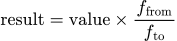
result equals value times from-factor divided by to-factor

Time Conversion =

1 Second (s) = 0.00027777778 Hour (h); 0.016666667 Minute (min)

Solution in Other Units

UnitValue
Second (s)1
Millisecond (ms)1000
Minute (min)0.016666667
Hour (h)0.00027777778
Day (d)1.1574074e-5
Week (wk)1.6534392e-6
Year (yr)3.1688765e-8
Microsecond (µs)1000000
Nanosecond (ns)1e+9

Show Your Work

Result = Value × (Source factor ÷ Target factor)
Base unit for this time family is Second (s).
1 Second (s) = 1 Second (s)
1 Second (s) = 0.00027777778 Hour (h)
1 Second (s) = 0.016666667 Minute (min)
Share:

How It Works

This converter uses the hour as its base unit in the shared unit system. Each supported time unit has a fixed factor relative to the hour, so the calculator converts your source duration into hours first and then divides by each target-unit factor to generate the full set of equivalent durations.

Example Problem

Convert 2.5 days to hours, minutes, and weeks for a scheduling worksheet.

  1. Start with the source value: 2.5 days.
  2. Convert days to the base unit: 2.5 × 24 = 60 hours.
  3. Convert hours to minutes: 60 × 60 = 3,600 minutes.
  4. Convert days to weeks by dividing by 7: 2.5 ÷ 7 ≈ 0.3571 weeks.
  5. The same duration is 60 hours and 3,600 minutes.
  6. So 2.5 days is also about 0.3571 weeks.

Key Concepts

Time conversion relies on fixed relationships such as 60 seconds per minute, 60 minutes per hour, and 24 hours per day. Larger units such as weeks and years represent longer spans built from those smaller intervals. Because the relationships are fixed, most time conversions are straightforward ratio conversions through a common base unit.

Applications

  • Project planning: translating schedules between hours, days, weeks, and years
  • Scientific and technical timing: converting short intervals into seconds, milliseconds, or microseconds
  • Operations and staffing: moving between shift hours, daily totals, and longer planning horizons
  • Data analysis: normalizing logged durations from different systems into one comparable unit

Common Mistakes

  • Confusing decimal hours with clock-style hours-and-minutes notation, such as reading 1.5 hours as 1 hour 50 minutes
  • Treating calendar months as a fixed-length conversion unit even though their day counts vary
  • Ignoring leap-year assumptions when comparing rough yearly totals over longer spans

Frequently Asked Questions

How do you convert time units?

Convert the source duration to the base unit first, then divide by the target-unit factor. That is the method this calculator uses.

What is the formula for converting seconds, minutes, hours, and days?

Use Result = Value × (source factor ÷ target factor), where the factors are defined relative to the common base time unit.

How many seconds are in an hour?

There are 3,600 seconds in one hour.

How many hours are in a day?

There are 24 hours in a day.

What is a millisecond?

A millisecond is one thousandth of a second.

Why do decimal hours cause confusion?

Because 1.5 hours means 1 hour plus half of an hour, which is 30 minutes, not 50 minutes.

Can I use this converter for very small and very large durations?

Yes. The calculator supports units from nanoseconds through years.

Time Conversion Formula

Time conversions use the hour as the common base unit in this unit set. The calculator converts your source duration into the base unit first, then expresses the same elapsed time in every other supported unit below.

Result = Value × (Source factor ÷ Target factor)
  • Result — the converted measurement in the target time unit
  • Value — the original measurement you enter
  • Source factor — the factor that maps the source unit to the common base unit
  • Target factor — the factor used to express the same base-unit value in the target unit

Worked Examples

Scheduling

How do you convert 3.5 hours to minutes?

A project plan is written in hours, but you want the same duration in minutes.

  • Start with the source value: 3.5 hours.
  • Use the relationship 1 hour = 60 minutes.
  • Multiply: 3.5 × 60 = 210 minutes.
  • You can also express it in seconds by multiplying by 3,600.
  • 3.5 hours = 12,600 seconds.
  • The same duration is 210 minutes.

A duration of 3.5 hours is 210 minutes.

This is a common calendar and workflow conversion for schedules and task estimates.

Timing

What is 90 seconds in minutes?

A timing result is in seconds, but you want to read it in minutes for a report.

  • Start with the source value: 90 seconds.
  • Use the relationship 1 minute = 60 seconds.
  • Divide: 90 ÷ 60 = 1.5 minutes.
  • That is also 0.025 hours.
  • The same duration is one and a half minutes.
  • So 90 seconds equals 1.5 minutes.

A duration of 90 seconds is 1.5 minutes.

Converting small intervals into minutes or hours can make process and pacing comparisons easier to read.

Planning

How do you convert 2 days to hours?

A schedule buffer is in days, but a staffing model uses hours.

  • Start with the source value: 2 days.
  • Use the relationship 1 day = 24 hours.
  • Multiply: 2 × 24 = 48 hours.
  • You can also convert that to weeks by dividing by 7 days per week.
  • 2 days ≈ 0.2857 weeks.
  • The same duration is 48 hours.

A duration of 2 days is 48 hours.

This is useful in staffing, travel, and deadline planning when time is expressed at different scales.

Related Calculators

Related Sites