Hex Calculator
Hexadecimal =
Conversion Details
- Decimal
- 255
- Binary
- 11111111
- Byte width
- 1 byte
Convert a base-10 integer into base 16. Divide the decimal by 16 repeatedly; each remainder is a hex digit, read from the last division to the first. Digits 10–15 are written as A–F.
decimal → base 16
Convert a hex value into base 10. Multiply each digit by 16 raised to the power of its position (counting from 0 on the right) and sum the results. Inputs are case-insensitive.
base 16 → decimal
Add two hex numbers. Sum digit-by-digit from the right, carrying when a column total reaches 16. Useful for offsetting memory addresses or summing byte counts.
a + b (base 16)
Subtract one hex number from another. Borrow 16 from the next column when needed. Returning a negative is allowed in this calculator (no two's complement).
a − b (base 16)
Multiply two hex values using BigInt arithmetic so results stay exact even for 64-bit or 256-bit inputs. Common in cryptography and bit-packing routines.
a × b (base 16)
Integer division of two hex values, returning a hex quotient plus a hex remainder. Dividing by zero is rejected. Useful for splitting an address range into equal chunks.
a ÷ b (base 16)
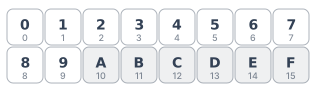
Hexadecimal is base 16. Each digit represents one of sixteen values: 0–9 keep their decimal meaning, and A–F stand for 10–15. Because 16 is 2 raised to the 4th, every hex digit maps to exactly four binary bits — a unit programmers call a nibble. That clean alignment is why hex is the preferred shorthand for binary in colors, memory dumps, MAC addresses, and file signatures: two hex digits compactly describe one byte (8 bits), four describe one 16-bit word, and eight describe a 32-bit register. To convert a decimal value to hex, divide by 16 repeatedly and read the remainders from bottom to top; to convert hex to decimal, multiply each digit by its place value (16 raised to the position) and sum the results.
Convert 255 from decimal to hexadecimal:
Result: 255 (decimal) = FF (hex) = 11111111 (binary) = 1 byte.
Hex is most useful as a compressed view of binary. One hex digit always represents four binary bits (a nibble), so two hex digits always represent one byte. That is why hex shows up in three common places: web colors (#RRGGBB packs three bytes — red, green, blue — into six hex digits, so #FF0000 is red, #00FF00 is green, #0000FF is blue), memory addresses (a 32-bit pointer fits in 8 hex digits, a 64-bit pointer in 16), and ASCII / file headers (every byte in a hex dump is two characters, columns of 16 bytes line up neatly). Hex also reads as a number, so arithmetic still works — addresses can be added and subtracted, byte counts can be summed, and offsets can be multiplied without leaving base 16.
Number each hex digit from right to left starting at position 0. Multiply each digit's value (0–9 stays as-is; A=10, B=11, C=12, D=13, E=14, F=15) by 16 raised to its position, then add the products. For example, FF = 15 × 16 + 15 × 1 = 240 + 15 = 255.
Divide the decimal value by 16 and record the remainder. Replace the original value with the quotient and repeat until the quotient is 0. Read the remainders from last to first — that string of hex digits is your answer. For example, 255 ÷ 16 = 15 R 15, then 15 ÷ 16 = 0 R 15, so the answer is FF.
Hexadecimal is a number system with base 16. It uses sixteen distinct digits — 0 through 9 for the first ten values and A through F for ten through fifteen. Because 16 is a power of 2, each hex digit corresponds to exactly four binary bits, which makes hex a compact and human-readable way to write binary data.
Hex compresses binary by a factor of four. A 32-bit integer takes 32 binary digits but only 8 hex digits, so memory addresses, machine code, and bit masks become much easier to read and type. Hex also aligns naturally to bytes — every two hex characters is exactly one byte — which matches how computers actually store information.
The 0x is a prefix used in C, JavaScript, Python, and most programming languages to mark a literal as hexadecimal. So 0xFF means the hex value FF, which equals 255 in decimal and 11111111 in binary — the largest value that fits in a single 8-bit byte.
A nibble is exactly half of a byte — four bits. It is the smallest unit hex represents directly, because one hex digit always equals one nibble. Two nibbles together form one byte, which is why two hex digits is always one byte.
The hex digits A through F are just names for the values 10 through 15; uppercase and lowercase carry no extra meaning. Most style guides recommend uppercase for human-readable output (this calculator follows that convention) but both forms parse to identical values.
FF, which equals 255 in decimal and 11111111 in binary. Adding 1 to FF produces 100 in hex (256 in decimal), which requires a second byte. That overflow point is why unsigned 8-bit numbers in programming languages cap at 255.
Reference:
Patterson & Hennessy, Computer Organization and Design: The Hardware/Software Interface (Morgan Kaufmann) — Appendix on number representation and base conversion.
Each hex digit sits in a place worth a power of 16, so a hex string dn…d1d0 evaluates to the sum:
Where:
The reverse direction — decimal to hex — repeatedly divides the decimal value by 16 and reads the remainders from last to first. One hex digit is one nibble (4 bits), and two hex digits are one byte (8 bits), which is why hex is the natural shorthand for binary.
Bytes
One byte is 8 bits, and 8 bits hold values from 0 to 255. Because every two hex digits represent one byte, the largest one-byte value is FF — two F's, each representing four 1-bits.
FF (hex) = 255 (decimal) = 11111111 (binary)
Web Colors
A CSS color like #FF0000 packs three bytes — red, green, blue — into six hex digits. Converting back to decimal recovers the familiar 0–255 RGB triplet that paint apps and image editors display.
#FF0000 = rgb(255, 0, 0)
Memory
Programmers sometimes initialize memory to a recognizable pattern like DEADBEEF so uninitialized reads stand out in a hex dump. Counting digits is the fast way to find its byte width.
DEADBEEF = 4 bytes = 3,735,928,559 (decimal)